Getting Started – A Guided Tour of Lenovo Laptops
Shopping for a new laptop can be overwhelming. From navigating tech specifications to comparing models and prices, finding the right laptop is no small feat. But fear not, we’re here to help at Lenovo.
With our guide, we’ll help you understand the essentials, ensuring that you're equipped with the knowledge to choose the perfect laptop from our diverse collection. Let’s get started!
Understanding Laptop Specifications
While every part of a laptop is essential, it’s the core technology within that allows your device to swiftly handle everyday tasks. Keep in mind that higher specifications typically lead to enhanced performance, but also contribute to a higher price point. It's wise to aim for the best specifications within your budget.
Processor
At the heart of every laptop is the processor or CPU (Central Processing Unit). Often regarded as the laptop's brain, the processor is responsible for executing instructions and processing information. The performance of your processor directly impacts how smoothly and quickly your laptop can run applications, respond to commands, and manage the tasks you wish to accomplish.
A swift and efficient processor is crucial for a seamless computing experience. Whether you're working on business projects, organizing your photo library, or indulging in the latest gaming adventures, the processor's capability ensures that your laptop can keep up with your pace without lagging or freezing.
Processor Performance
When it comes to understanding processor performance, speed is of the essence. Measured in gigahertz (GHz), a higher number typically indicates that a processor can handle more tasks. However, speed isn't the only factor that contributes to performance; multi-core processors also significantly boost overall performance.
With multi-core processors, your laptop can effectively divide and conquer, assigning different tasks to different cores. This multi-tasking capability is vital for performance, especially when dealing with demanding applications that require a lot of computational power. Whether you're rendering video, compiling code, or playing graphics-intensive games, having a processor with an ample core count can make all the difference.
How much processing power do I need?
The processing power required is tailored to your laptop's intended use. For routine tasks like web surfing and office applications, a basic processor will ensure smooth day-to-day operations.
However, if you're into creative pursuits, demanding games, or data-intensive programs, opting for a higher-tier processor with increased speed and cores will keep your workflow fluid and responsive.
RAM
Random Access Memory, or RAM, acts as your laptop's immediate memory storage, essential for handling the tasks you're actively working on. Unlike long-term storage, RAM temporarily holds data for quick access by the processor. This fast-access space is crucial for the operation of your laptop as it directly interacts with the applications you have open. Whether you're editing a document or browsing the web, RAM is hard at work, ensuring everything runs smoothly.
The importance of RAM cannot be understated, especially when it comes to multitasking. Adequate RAM allows you to switch between programs and run multiple applications simultaneously without experiencing lag. If you've ever had too many browser tabs open and felt your laptop slow to a crawl, it's likely due to insufficient RAM.
How much RAM do I need?
RAM capacity, measured in gigabytes (GB), comes in a variety of configurations to accommodate your computing needs. The amount of RAM in your laptop is like the width of a highway—it dictates the volume of traffic, or data, that can travel swiftly to and from the processor. An ample amount of RAM ensures that your system maintains its responsiveness and is able to effortlessly handle multiple processes at once. Here are some common RAM configurations for laptops:
4GB
This is suitable for those who engage in basic tasks, such as word processing and internet browsing, and is ideal for lighter, everyday use.
8GB
8GB of RAM supports most applications, programs, and modern games to run smoothly.
16GB
Designed for demanding computing tasks like video editing and gaming, 16GB delivers fast and consistent performance, catering to high-end requirements.
With Lenovo laptops, you can find tailored solutions with various RAM capacities, providing a balanced system that caters to both your performance needs and budget considerations.
Storage Capacity
The storage in your laptop functions as the vault for all your data—it's where your applications, documents, and media files live. There are two main types of storage to consider: HDDs (Hard Disk Drives) and SSDs (Solid State Drives).
HDDs are the traditional storage technology, known for offering large storage capacities at a lower cost. SSDs, however, are newer and faster, providing quicker data access and boot times, enhancing overall laptop responsiveness, albeit typically at a higher price point.
Storage capacity requirements vary according to the types of tasks you perform. Basic computing activities like creating documents and browsing the web won't take up too much storage, but if you're someone who deals with large files, such as high-resolution photos, videos, or complex applications, you'll require more substantial storage space.
How can I select the right storage capacity for my laptop?
When it comes to choosing the right storage size, it's a balance between your current needs and future demands. While a smaller capacity may be adequate for light users and prove to be cost-effective, larger storage capacities offer the headroom for extensive collections of files and applications, as well as the convenience of not needing to manage storage space as frequently.
In addition to storage size, the type of storage also plays a pivotal role. Solid State Drives (SSDs) have become increasingly popular due to their rapid boot times and fast data retrieval capabilities which significantly speed up your workflow.
Graphic Capabilities
Graphics cards, also known as GPUs (Graphics Processing Units), are critical components in laptops that render images, videos, and animations onto your screen.
They come in two main types: integrated graphics, which are built into the processor and share memory with the CPU, and dedicated graphics, which are separate hardware components with their own memory.
While integrated graphics are sufficient for general use and can handle basic tasks such as streaming video and simple photo editing, dedicated graphics cards offer enhanced performance for more graphically intensive tasks, providing smoother visuals and faster rendering.
A laptop's graphics capabilities become crucial when tackling tasks that require superior visual quality and fluid performance. For gamers, a laptop with powerful graphics can mean the difference between a choppy and immersive gameplay experience. For creatives involved in video editing, animation, or graphic design, these capabilities ensure that rendering times are reduced and that the final products are rendered in the highest fidelity.
Choosing the Right Laptop for Your Needs
At Lenovo, we’re excited to match the perfect laptop companion to your lifestyle.
Explore our collection where each laptop is more than just a tool, it's a catalyst for your creativity, gaming prowess, and productivity.
Types of Laptops
Traditional Laptops
Traditional laptops, like the IdeaPad series offered by Lenovo, stand out for their versatility. They are the all-rounders of the computer world, designed to handle a broad range of tasks from web browsing and word processing to more demanding work such as graphic design and light gaming. They generally offer a balance of performance, battery life, and portability, making them suitable for a wide demographic of users.
Business Laptops
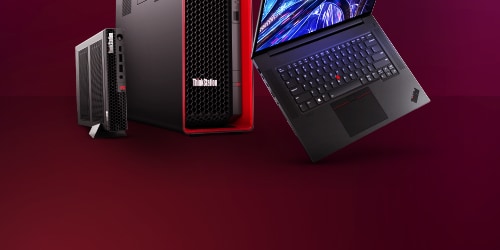
For business laptops where performance and reliability are essential, the Lenovo ThinkPad series merges innovation with tradition to provide dependable devices tailored to the demands of professionals. With their ergonomic keyboards, advanced security features, and enduring battery life, these laptops are a resilient and trustworthy partner throughout your workday.
Mobile Workstations
Mobile workstations offered by Lenovo are designed for professional users who require desktop-level power on-the-go. Lenovo’s ThinkPad and ThinkBook series offer top of the line specs, excellent build quality, and are engineered to handle resource-intensive tasks like 3D rendering, complex data analysis, and professional-grade content creation.
The ThinkBook P Series builds on this legacy by offering a balance of form and function. With a slim aluminum exterior and multicore processors, it’s designed to keep up with the rigorous pace of creative professionals everywhere.
Ultrabooks
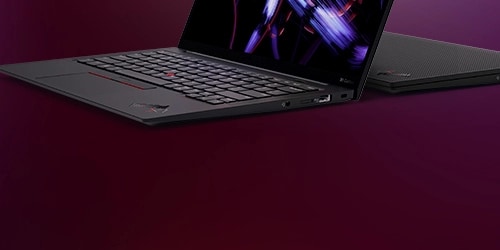
Ultrabooks, such as Lenovo Slim and ThinkPad series, stand out due to their slim, lightweight design and efficient performance. These laptops are characterized by their use of high-efficiency processors and solid-state drives (SSD), providing speedy boot-ups and quick application launches. Their sleek form factor and extended battery life also make Ultrabooks highly portable.
Gaming Laptops
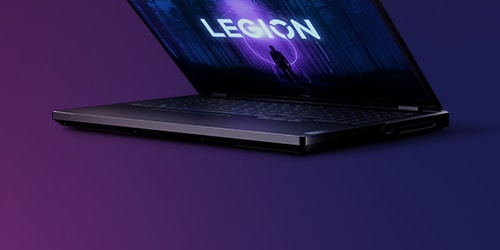
Gaming laptops are built for performance. Lenovo’s Legion series features high-end processors, top-tier graphics cards, and ample RAM to manage the most graphically demanding games. They often come with enhanced cooling systems to keep things running smoothly during intense gaming sessions. When shopping for a gaming laptop, look for a high-refresh-rate display and customizable gaming features. For an optimal gaming experience, consider exploring Lenovo's Legion series, which offers a lineup specifically engineered to meet the needs of gamers.
2-in-1 Laptops or Convertible Laptops
2-in-1 or convertible laptops combine the functionality of a traditional laptop with the portability of a tablet. Thanks to their convertible or detachable designs, these versatile devices can switch between keyboard and touchscreen modes, offering a flexible user experience. They are particularly useful for those who value touch capabilities for tasks like note-taking, drawing, or casual web surfing. Discover the versatility of Lenovo's ThinkPad, IdeaPad, and Yoga series to find a 2-in-1 laptop that effortlessly adapts to your touch-based tasks and creative pursuits.
Chromebooks
Chromebooks run on a cloud-based operating system and are optimized for internet usage and applications from the Chrome Web Store. They're renowned for their user-friendly interface, and security features. These devices are optimal for users who rely heavily on cloud services and web-based applications. Due to their affordability and secure operating system, Chromebooks serve as excellent entry-level notebooks, particularly for children.
Budget Friendly Laptops
At Lenovo, we understand the need for cost-effective computing solutions without compromising on quality. Whether you're a student, an emerging entrepreneur, or simply need a reliable laptop for everyday use, Lenovo ensures that you can find a model that fits your budget.
Once you've identified a laptop that suits your lifestyle, explore the budget-friendly versions across our most popular series, including Yoga, IdeaPad, ThinkPad, and ThinkBook. With Lenovo, you gain access to a world where premium performance meets affordability, ensuring you don't have to compromise.
Types of Uses
For Work
For the work warriors out there, your laptop needs to be a multitasking powerhouse, capable of keeping up with your pace. Consider a ThinkPad or ThinkBook series laptop which comes equipped with a robust processor, ample RAM, and sizable storage to effortlessly run multiple applications. They’re also equipped with a comfortable keyboard for frequent typing and are built to be durable for travel. After all, your laptop isn't just a gadget; it's your office away from the office.
For School
For students, your laptop should be as adaptable as your study habits. Ensure your laptop is lightweight to easily move between classes. Seek out machines with long-lasting battery life to avoid mid-lecture power panics. Decent performance for research, paper writing, and the occasional study break (we won't tell) are a must. Consider Lenovo’s IdeaPad or Yoga series which offer a combination of performance and value.
For Entertainment
For entertainment enthusiasts, a Lenovo Legion or ThinkPad series laptop can double as a personal cinema and gaming station. Immerse yourself in crisp, high-resolution displays and rich audio for binge-watching sessions. If gaming is your go-to, don’t skimp on the graphics card. Solid state drives can also offer faster load times for media and games. And while you're at it, a comfortable keyboard and trackpad can make all the difference when you're navigating new worlds or queueing up the next show.
For The Constant Connection
In today's fast-paced world, the ability to work, be creative and play on the move is non-negotiable. This makes battery life and portability two of the most critical factors in choosing a new laptop. Go for a device that promises a battery life capable of getting you through a full day's work or a lengthy commute so that you're not perennially tethered to a power outlet.
Exploring Lenovo's Laptop Collection
Lenovo’s Flagship Laptop Models
Lenovo’s flagship laptop models are designed with variety and versatility in mind, ensuring there’s a perfect fit for every lifestyle and use case. Whether you’re a professional, student, or gamer, Lenovo has a laptop ready to exceed your expectations.
Yoga: The Flexible Performer
For those who demand versatility without compromise, the Yoga series is your canvas. Its signature 360-degree hinge and touchscreen capabilities mean you can switch between modes—laptop, tablet, tent, or stand—to match your current needs, blending productivity with creativity.
Lenovo Slim: The Sleek Traveller
For those who prioritize portability without compromising on power, the Lenovo Slim series is a match. These ultraportable laptops offer trim and lightweight designs paired with performance that satisfies the demands of on the go productivity and entertainment.
ThinkPad: The Business Companion
ThinkPad is synonymous with business-grade performance and cutting-edge technology. Favored by professionals for its powerful features and robust security, it’s the workhorse that defines industry standards and exceeds them.
ThinkBook: The Modern Professional’s Choice
With the ThinkBook, modern professionals find the sweet spot between enterprise-level performance and consumer-friendly aesthetics. This series delivers efficiency with style, making it suitable for dynamic business environments.
Legion: Perfect for Gamers
For gamers, the Legion series is your battlefield. Engineered for the ultimate gaming experience, it boasts high-refresh-rate displays, cutting-edge GPUs, and processors that can handle even the most resource-intensive games.
IdeaPad: The Everyday Essential
IdeaPad serves the everyday user who seeks reliability and value. It’s the go-to series for those who want a laptop that covers all the bases from work to play without skipping a beat.
Transition with ease from work to leisure with the IdeaPad Flex, a laptop designed for versatility, allowing you to switch between traditional, stand, tent, and tablet modes to suit your task at hand, wherever you are.
Chromebooks
Lenovo Chromebooks provide a streamlined, cloud-centric computing experience, perfect for those integrated into Google's ecosystem. Lightweight, secure, and user-friendly, Lenovo's Chromebooks are excellent for education, casual web browsing, and anyone embracing the efficiency of cloud storage and applications.
Innovative Features and Technologies
Welcome to the inventive realm of Lenovo's technological advancements, where every detail is engineered to inspire. With a pioneering spirit, Lenovo doesn't just follow trends, it sets them. Discover the features that put Lenovo laptops in a class of their own.
High-Resolution, Color-Accurate Displays
Lenovo notebooks offer high-resolution displays that bring the digital world to life with stunning clarity. Color accuracy is paramount, providing creative professionals with the confidence that their work reflects true-to-life hues and impeccable detail.
Long Battery Life with Rapid Charge Capabilities
Your time matters, and Lenovo knows it. That's why selected laptops boast long-lasting battery life complemented by Rapid Charge technology—plugging in for just a few minutes gives you hours of productivity and entertainment.
Integrated Security Features
With more threats than ever lurking in the digital realm, Lenovo doubles down on security. Features like Trusted Platform Module (TPM) chips create a fortress for your data, securely housing passwords, certificates, and encryption keys away from the prying eyes of hackers and software-based attacks. Certain models may also feature Kensington lock slots act as the first line of defense, safeguarding your data at the hardware level.
Touchscreen Displays with Pen Support
Transform the way you work and play with touchscreen displays enabled with pen support. Lenovo makes it possible to jot down notes, sketch ideas, and interact with your device in a more natural and intuitive way.
Industry-Leading TrackPoint
Navigate with pinpoint precision using Lenovo's signature TrackPoint . This distinctive red dot has become synonymous with Lenovo's dedication to user experience, offering an alternative and precise way to interact with your laptop without lifting your fingers from the keyboard.
Customization Options and Accessories
Personalize your computing experience with Lenovo’s range of signature accessories. Crafted to complement and enhance your device, these accessories ensure seamless compatibility and performance.
Lenovo-specific Accessories
With Lenovo-specific accessories, they are designed to match the reliability and build quality of your laptop. From sleek docks to stylish cases, each accessory is engineered to sync perfectly with your device, ensuring an optimized user experience. Designed with precision, Lenovo’s array of accessories—including docking stations, ergonomic keyboards and mice, and protective cases—perfectly complement your tech setup.
Lenovo Digital Pens
For those with touch-enabled devices, the Lenovo Active Pen transforms your laptop into a digital canvas. Sketch, write, and navigate with precision—just as you would with pen and paper—giving you the freedom to express and create anywhere, anytime.
Power Consistency: Adapters and Chargers
Keep your laptop powered up with Lenovo’s original power adapters and chargers. Designed to provide a consistent and safe power supply, they are built to the highest standards, ensuring longevity and reliability for your device.
Monitors
Elevate your work environment by integrating an external Lenovo monitor for a dual-screen setup. Enhance your productivity as you expand your digital workspace, effortlessly adding screen real estate for multitasking and detailed projects.
Cable Management Solutions
Lenovo also offers smart cable management solutions to keep your workspace neat and organized. Reduce clutter with these practical accessories, providing you with a clean and efficient environment that complements your productive lifestyle.
With Lenovo’s accessories and customization options, you can tailor your workspace to fit your needs, all while maintaining a sleek, efficient, and high-quality design. Whether at home, in the office, or on the go, these personalized touches make all the difference in crafting a space that’s uniquely yours.
Why You Should Consider Lenovo Laptops
Lenovo’s Reputation for Durability and Reliability
Lenovo laptops like the celebrated ThinkPad and Yoga series are built to last. They are acclaimed for a robust design that meets the wear and tear of both professional and casual use, ensuring your investment endures through countless clicks, taps, and travels.
Competitive Pricing
Offering something for everyone, Lenovo has a range of notebooks that balance superior quality with wallet-friendly prices. Access technology-packed devices without the high upfront cost—from versatile Chromebooks to powerhouse workstations.
Customer Support and Warranty
Enjoy ease of access to Lenovo’s highly praised customer service and solid warranty offerings, all part of our reliable safety net for your new tech companion.
Free Shipping
Skip extra costs and get your chosen device delivered free, straight to your doorstep. Hassle-free and ready to power up your productivity.
Now that you've gained a better understanding of the components inside a laptop and the factors that should guide your purchase decision, we're confident you'll make an informed choice. We look forward to your new Lenovo tech companion that's just right for you, chosen from our extensive and diverse range of models.