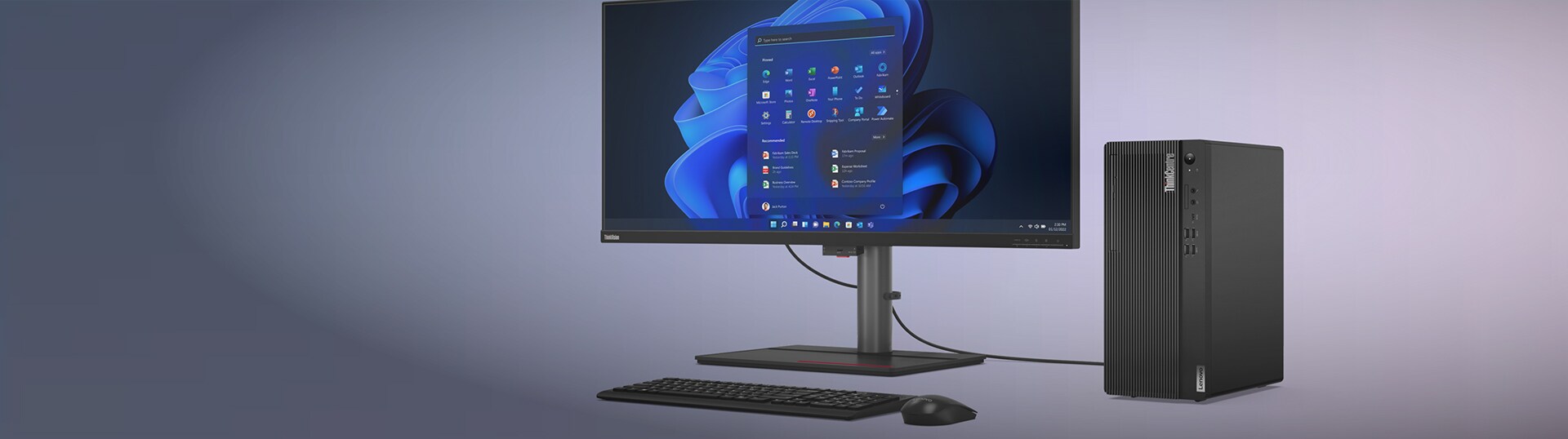

Business Desktops
For work of all types, and companies of all sizes. Call a Business Specialist.
1-866-426-0911

Business Desktops
For work of all types, and companies of all sizes. Call a Business Specialist.
1-866-426-0911

Businesses Always save more in Lenovo Pro, guaranteed. No minimum required to start saving today!
Business desktops are generally designed around workplace and IT requirements, while consumer desktops are typically designed for broader personal-computing needs. Business desktop computers can emphasize standardized configurations, manageability, security options, connectivity, serviceability, and deployment planning. Features vary by model, configuration, and region, so businesses should review specifications rather than assume every system includes identical capabilities.
Choose a business desktop based on your workload, software, workspace, and IT requirements. Compare the processor, memory, storage, graphics, operating system, ports, expansion options, manageability, and monitor support. Also check application compatibility, peripheral support, deployment needs, service options, and model-specific specifications.
Lenovo offers several desktop options for business users, including ThinkCentre desktops, ThinkStation workstations, and select IdeaCentre desktops for office use. ThinkCentre models cover a range of business form factors, while ThinkStation systems are designed for more demanding professional workloads. IdeaCentre desktops can support general office and everyday productivity needs. Available features, configurations, form factors, and services vary by model and region.
Start with the software and tasks your team uses most. Match the processor and memory to the workload, choose SSD storage based on your file needs, and consider dedicated graphics for graphics-heavy applications. Also compare desktop size, upgrade options, monitor support, ports, network connectivity, and operating system requirements before choosing a business desktop PC. The best option depends on your specific workload, workspace, budget, and IT requirements.
Memory and storage needs depend on software, multitasking, file sizes, and data-management practices. For a work desktop computer, review each application’s minimum and recommended requirements, then allow capacity for concurrent programs and file growth. Supported memory, storage types, capacities, and upgrade paths vary, so check specifications before selecting a configuration.
Tower, small form factor, and compact desktops mainly differ in size, expansion space, and placement flexibility.
Tower desktop: Typically provides more internal space for storage, expansion cards, and supported upgrades.
Small form factor desktop: Uses less space than a tower while still supporting some internal expansion.
Compact desktop: Typically has a smaller footprint and can suit space-limited setups, though internal expansion is usually more limited.
The right desktop for business depends on workspace, performance needs, ports, and future upgrade requirements.
All-in-one computers can support business use when workspace simplicity and an integrated display matter. An all-in-one desktop computer for work combines the PC components and display in one unit. But display size, adjustability, ports, external-monitor support, and upgrade options vary. Confirm peripheral, network, software, and workspace requirements before selecting a model.
A desktop workstation is appropriate when specialized applications require workstation-class processing, professional graphics, larger memory configurations, expansion options, or relevant ISV certifications. Standard work PCs generally support email, documents, web applications, meetings, and routine business software. Review the software vendor’s requirements and official workstation specifications before deciding which category matches the workload.
Lenovo ThinkCentre desktops are designed for business computing, while ThinkStation workstations are built for more demanding professional workloads. ThinkCentre systems support office applications, communication, multitasking, and business operations, with different form factors and configuration options. ThinkStation systems can offer higher-end processor options, professional graphics, larger memory configurations, and additional expansion capabilities on select models. They are suited to workloads such as engineering, 3D design, data science, and media production. Features vary by model.
Many desktop computers for business can support multiple monitors, depending on graphics hardware, display outputs, operating system, and configuration. Check available video ports, supported display limits, monitor inputs, cable requirements, and adapter needs. Review the desktop’s product specifications and user guide before planning a multi-monitor setup for the workplace.
Before buying a desktop computer for work, check whether its connectivity options support your monitors, peripherals, network, and other devices. Look for USB-A and USB-C® ports for accessories and data transfer, and HDMI® or DisplayPort™ connections for monitors. Ethernet can provide wired network access, while WiFi and Bluetooth® support compatible wireless networks and peripherals. The number and type of connections vary by desktop, so compare them with your current setup and future requirements.
A complete setup for desktop computers for office use can include accessories such as monitors, keyboards, mice, webcams, headsets, and speakerphones based on your work requirements. Lenovo also offers monitors, input devices, audio products, cables, and adapters for different workspace requirements. Check compatibility with the selected desktop and configuration. These accessories can help support productivity, communication, and connectivity across different business setups.
Businesses should check the desktop’s graphics configuration, available display ports, and the number and resolution of monitors it supports. Also confirm monitor inputs, cable or adapter requirements, and whether display capabilities vary by model or configuration. Reviewing the product specifications before setup helps determine whether the selected Lenovo desktop can support the planned multi-monitor arrangement.
A business desktop computer may need dedicated graphics when the software or workload benefits from additional graphics processing. This can include 3D design, computer-aided design (CAD), video production, rendering, visualization, and other graphics-intensive applications. For work computers used mainly for general office tasks such as email, documents, web applications, and meetings, integrated graphics may be sufficient. Check the software requirements and desktop specifications before choosing a graphics configuration.
Businesses should first identify the connections required by their existing monitors, keyboards, mice, storage devices, network equipment, and other peripherals. When choosing a desktop computer for work, compare those requirements with available USB-A, USB-C®, HDMI®, DisplayPort™, Ethernet, audio, and other ports. Port types and quantities vary by model, so also check whether cables or adapters are required for the existing setup.
IT teams should base standardized business computer configurations on employee roles, application requirements, and the existing IT environment. Compare processor, memory, storage, graphics, operating system, ports, network connectivity, manageability, peripheral compatibility, and available expansion options. Using consistent configurations across similar business computers and work PCs can also simplify deployment and ongoing device management.
The choice depends on workspace, performance, expansion, and display requirements. A traditional desktop for business can provide more flexibility for monitor selection and may offer additional expansion options, while an all-in-one combines the computer and display in one unit to reduce the number of separate components on the desk. Businesses should compare ports, display specifications, upgrade options, peripherals, and model-specific capabilities before deciding.
When comparing Lenovo desktops for work, businesses should consider how the workspace will be used, the applications required, and the available desk space. Shared workspaces may benefit from compact systems with suitable connectivity and easy access to common peripherals, while dedicated workspaces can be configured around individual performance, storage, display, and expansion needs. Features and form factors vary by model, so businesses should compare specifications before selecting a configuration.
Whether you're a small business or large enterprise, you no doubt have many financial priorities. You need to ensure that your employees have reliable tools to help them succeed at their day-to-day activities. You're also interested in efficient products that can help you save on energy costs, keep your sensitive data secure, and you want the peace-of-mind to know that you won't need to make any major hardware replacements in the near future.
Lenovo business desktop PCs can help with all the above, and so much more. Look to our well-established line of work computers, like ThinkCentre business desktop computers and ThinkStation business workstation computers, or help drive small business creativity and add a touch of style to your modern workspace with IdeaCentre office PC models. And for those who work from the road, there's a wide variety of Lenovo laptops to meet your needs. No matter which option is best for your business, Lenovo has you covered.
Every Lenovo office desktop and laptop comes preloaded with up to Windows 11, the gold standard in office desktop computing. Windows 11 is an intuitive, easy-to-use operating system that offers a variety of powerful features to meet your business needs. Those include built-in tools that help individuals and teams work more efficiently; comprehensive device management that supports users on-premises, in the cloud, or both; simplified deployment and updating; and advanced security powered by cloud intelligence.
The Lenovo Think brand name is long synonymous with business productivity, reliability, and security. And while our ThinkPad laptops may be more widely recognized, our ThinkCentre business desktop computers and ThinkStation business workstation computers are stationary workhorses that are perfect for your place of business or home office setup.
Both our Think office PC lines are packed with powerful options and features that will fuel next-level productivity and creativity, like select ISV-certified ThinkStation workstation desktop models with discrete NVIDIA® Quadro® graphics and the latest Intel® Core™ or Intel® Xeon® processors.
ThinkCentre business desktop computers are the no-nonsense desktops your business deserves. Highly-expandable, these office desktop PCs will withstand the test of time—saving you money in the long term. They're also easy for any employee to use and come loaded with the advanced security features of Windows 11 as standard. Keep your business productive, efficient, and profitable with ThinkCentre business desktop computers
IdeaCentre office PC models are built with the modern office in mind. Today's office spaces are modernizing at a rapid pace, and our sleek and productive IdeaCentre all in one office PC models and slim office desktop towers are ready for them. But don't let the flashy exteriors fool you as IdeaCentre desktops feature as many bells and whistles on the inside as they do on the out.
ThinkCentre business desktop computers and IdeaCentre office PC models are some of the best home office computer options around. With so many available form factors, there's a Lenovo office PC that will fit practically anywhere you need it to. Our business desktop computers come in a range of sizes that include space-saving ThinkCentre Tiny office PC models, all in one office PC models that pack all the features of a business desktop right into the monitor, and small form factor office PC models that reduce the size of a business desktop tower to a fraction of what it normally is. And every ThinkCentre office desktop and IdeaCentre office PC comes preloaded with Windows 11, the most advanced operating system on the market.
Still not sure what to choose? Our handy Lenovo FAQ section has tips and guidance around dozens of PC and technology topics. And our business desktop FAQ can help you find what's the best business desktop for you.
Most of our office desktop towers come with a keyboard and mouse, but you'll probably need a new business monitors so that you can get to work right from the initial bootup. Look to our premium ThinkVision business monitors to round out your new Think desktop setup.