
What are laptops for photo editing?
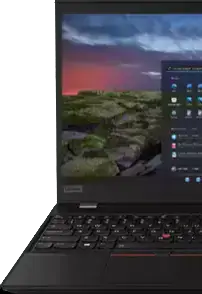
Laptops for photo editing are specialized computers designed to handle the intensive tasks associated with editing photos, like processing high-resolution images, running editing software efficiently, and accurately displaying colors. Tailored for photographers, graphic designers, and creative professionals, these laptops prioritize powerful processors, high-quality displays, and dedicated graphics cards to ensure the editing process is smooth and precise.
Can laptops for photo editing be used for video editing?
Yes, laptops for photo editing can often be used for video editing. The features that make these laptops ideal for photo editing, such as robust processing power, ample memory, and advanced graphics capabilities, are also beneficial for video editing. However, video editing may require additional storage and more powerful specs depending on the complexity of your projects.
What should I look for in a display on laptops for photo editing?
When considering laptops for photo editing, prioritize displays with high resolution, wide color gamut, and excellent color accuracy. A minimum resolution of 1080p is standard, but 4K resolution provides more detail and workspace. Look for color coverage, ideally 100% sRGB at least, for accurate color representation. Also, consider the panel type; IPS panels typically offer the best color consistency and viewing angles.
Does the type of processor affect laptops for photo editing?
Absolutely, the type of processor greatly affects the performance of laptops for photo editing. A powerful processor ensures faster image processing, smoother operation of editing software, and more efficient multitasking capabilities. Look for laptops with multi-core processors (Intel® i5, i7, or Ryzen™ 5, 7) as they offer the processing power needed for intensive photo editing tasks.
How important is RAM for laptops for photo editing?
Random access memory (RAM) is critically important for laptops for photo editing, because it directly influences performance speed and the ability to handle multiple tasks simultaneously. Generally, a minimum of 8GB of RAM is recommended for basic editing, but 16GB or more is ideal for working with high-resolution images or complex edits in editing software.
How much storage do I need on laptops for photo editing?
The amount of storage you need on laptops for photo editing depends on the volume of work and the size of your files. High-resolution images and editing software can quickly consume storage space. Starting with at least 256GB of SSD storage is advisable, but 512GB or more is recommended for more extensive collections and projects to ensure ample space for current and future work.
What makes the keyboard and trackpad important on laptops for photo editing?
The keyboard and trackpad are important on laptops for photo editing for comfort and efficiency during long editing sessions. A backlit keyboard can be particularly useful for working in dim environments. Precision and responsiveness in the trackpad enhance the ease of making fine adjustments and selections in photo editing software, contributing to a more seamless editing process.
How does screen size impact the usability of laptops for photo editing?
Screen size directly impacts the usability of laptops for photo editing by affecting the amount of workspace available and the portability of the device. Larger screens, around 15 to 17 inches, provide more space for tools and panels in editing software, making it easier to focus on details without constant zooming and scrolling. However, smaller screens offer greater portability for those who edit on the go.
What role does battery life play in laptops for photo editing?
Battery life is crucial for laptops for photo editing, especially for professionals who work on location or travel frequently. Longer battery life means you can work on your photo editing projects without constantly worrying about finding a power outlet. Aim for laptops that offer several hours of operation on a single charge to ensure that you can get through at least most of an editing session or workday uninterrupted.
Does color calibration matter in laptops for photo editing?
Color calibration is vital in laptops for photo editing to ensure that the colors you see on the screen accurately reflect the final output, whether for print or digital use. It guarantees that the edits you make and the colors you choose appear consistent across different devices and mediums. Some laptops come with pre-calibrated displays, while others may require the use of external tools and software for calibration.
Can laptops for photo editing run all photo editing software smoothly?
Laptops for photo editing are designed to run a wide range of photo editing software smoothly, but the performance may vary depending on the specific software's requirements and the laptop's specs. High-end laptops with powerful processors, ample RAM, and dedicated graphics cards are better equipped to handle resource-intensive software and complex editing tasks without lag.
How does a high refresh rate screen benefit laptops for photo editing?
A high refresh rate screen benefits laptops for photo editing by providing a smoother experience when scrolling through images or zooming in and out of photos. While a higher refresh rate is more commonly sought after by gamers for seamless motion, it can also contribute to a more fluid and responsive editing experience, although it's not as critical as high resolution or color accuracy for photo editing.
What is the advantage of having multiple ports on laptops for photo editing?
Having multiple ports on laptops for photo editing offers the advantage of connecting various peripherals and devices simultaneously, such as external hard drives, SD card readers, monitors, and more. This connectivity enhances workflow efficiency, allowing easy access to files, extending the display across multiple screens, and ensuring that devices necessary for a complete photo editing setup are conveniently supported.
Does an operating system matter in laptops for photo editing?
Yes, the operating system matters in laptops for photo editing as it can affect the compatibility and performance of photo editing software. Different software may perform better or be exclusively available on certain operating systems. Additionally, the operating system can influence the user experience, including file management and customization options, which are important for optimizing your workflow.
Could a touch screen be beneficial on laptops for photo editing?
A touch screen can be beneficial on laptops for photo editing by offering an intuitive way to interact directly with your photos and editing software. It allows for hands-on control during the editing process, such as quick navigation, pinch-to-zoom functionality, and using touch gestures for adjustments, providing an additional layer of convenience and efficiency.
What is the significance of an SSD in laptops for photo editing?
The significance of a solid state drive (SSD) in laptops for photo editing lies in its speed and reliability compared to traditional hard drives. SSDs offer faster boot times, quicker file transfers, and overall snappier performance, which means less waiting and more doing, especially when handling large files. They are also more resistant to impact and movement, making them a better choice for professionals who frequently travel with their laptops.
Are there any accessories that can enhance the performance of laptops for photo editing?
There are several accessories available that can enhance the performance of laptops for photo editing, such as external monitors for additional screen real estate, graphics tablets for precision editing, and color calibration tools to ensure accurate color representation. Additionally, investing in a good quality carrying case and ergonomic accessories like a mouse or keyboard can improve comfort and productivity during extended editing sessions. Overall, these accessories can help create a more efficient and personalized photo editing setup tailored to your specific needs.