



Find Your Setup
Featured content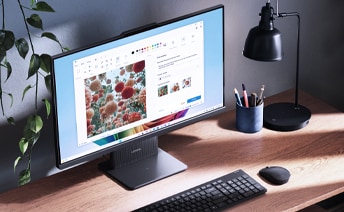



Home Office
Stay productive and focused with IdeaCentre desktops built for smooth multitasking, fast load times, and a quiet, clutter‑free workspace. Perfect for remote professionals who need reliability, performance, and a setup that helps them stay “in the zone.”
Family
From homework to movie nights, IdeaCentre desktops keep everyone connected with dependable performance, ample storage, and family‑friendly durability. A worry‑free PC that supports school, entertainment, and everyday browsing, all in one place.
Student
Ace assignments and boost productivity with IdeaCentre desktops designed for fast performance, efficient multitasking, and space‑saving setups made for dorms or study corners. A reliable partner for research, projects, and staying ahead in class.
Creator
Bring your ideas to life with IdeaCentre desktops made for editing, designing, and intensive creative workflows. Enjoy smooth performance, stunning visuals, and the power to handle your next big project without interruption.
Compare by Category
Featured content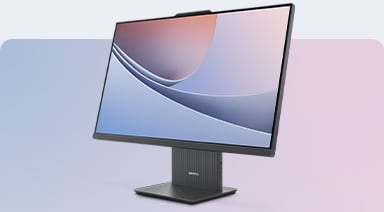
All in One Desktops
IdeaCentre AIO desktops combine a full PC and a vibrant display into one sleek device, giving you space‑saving design, built‑in entertainment features, and smooth everyday performance without the cables or bulk.
Mini Desktops
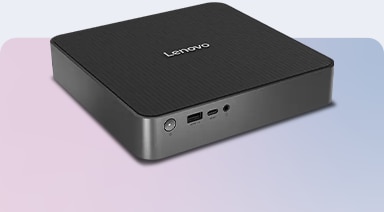
IdeaCentre Mini desktops deliver impressive speed and reliable performance in a footprint that fits anywhere. Enjoy modern connectivity, quiet operation, and the freedom to build a tidy, flexible workspace.
Traditional Desktops
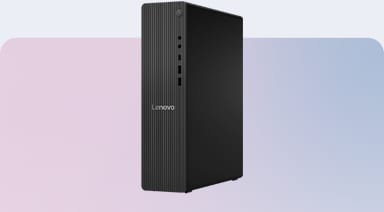
IdeaCentre Tower desktops offer strong processing power, smooth multitasking, and room for upgrades, giving you long‑term value and the flexibility to expand as your needs evolve.
Pick your payment option
ca_ideacentre_mar16_test
5b3fff34-65d2-4f28-91b1-2eb1072c40a8
Lenovo IdeaCentre is a family of consumer desktop computers for home and everyday computing. The lineup includes tower, Mini, and all-in-one desktops for different workspace and setup needs. Depending on the model and configuration, IdeaCentre desktops support productivity, study, entertainment, creative tasks, and everyday multitasking.
Begin by identifying the applications you use, the number of displays required, and your preferred desktop format. Then compare the processor, memory, storage, graphics, ports, and included operating system. The appropriate Lenovo IdeaCentre desktop configuration depends on your workload, available space, accessory requirements, and planned connections.
The IdeaCentre range generally includes traditional tower desktops, compact Mini systems, and all-in-one computers. Towers offer a conventional desktop format, Mini models prioritize a smaller footprint, and all-in-one designs integrate the computer and display. Model categories, features, and availability may differ across markets and product generations.
Yes, they can support photo editing, entry-level video editing, digital artwork, and other creative activities. Suitability depends on the software requirements and the system’s processor, graphics, memory, and storage configuration. Users working with high-resolution media or complex projects should compare application requirements with the official product specifications before purchasing.
Processor choices vary across IdeaCentre families, models, regions, and product generations. Available configurations may include processors intended for routine home computing, multitasking, or more demanding creative activities. When comparing Lenovo IdeaCentre desktops, review the processor generation, graphics configuration, software requirements, and specifications of the exact model.
Yes, depending on the specific Lenovo IdeaCentre model and configuration. Some models may offer choices for processors, memory, storage, graphics, and other components when purchased, while upgrade options after purchase vary by model. Check the specifications and upgrade information for the specific IdeaCentre desktop to determine which components can be configured or upgraded.
Some tower models may support graphics upgrades when a replacement component meets the model’s documented requirements. Compatibility depends on the chassis dimensions, motherboard interface, power supply, connectors, and supported graphics specifications. Before making changes, review the model documentation and applicable support terms. All-in-one and Mini models generally offer more limited internal access.
Yes, some Lenovo IdeaCentre desktops can be upgraded over time, but upgradeability varies by model. Depending on the configuration, users may be able to upgrade components such as memory or storage. However, certain components may be integrated or have model-specific limitations, so it’s important to check the specifications and upgrade options for the specific IdeaCentre desktop.
Yes. Many Lenovo IdeaCentre desktops can support multiple displays, depending on the specific model and its available video ports and graphics capabilities. Check the specifications of your chosen IdeaCentre desktop to confirm the supported number, type, and resolution of external displays.
A Lenovo IdeaCentre Mini desktop provides desktop computing in a compact enclosure that can fit into space-conscious work areas. Depending on the configuration, it may support everyday applications, streaming, communication, and office tasks. Users should compare port selection, memory, storage, graphics capabilities, and upgrade access before choosing a Mini model.
A Lenovo IdeaCentre all in one integrates the computer components and display into one main unit. This arrangement can reduce the number of separate devices placed on a desk and simplify cable planning. Screen size, stand design, port selection, camera features, and component accessibility vary across available models and configurations.
Lenovo IdeaCentre desktops computers are compatible with a range of accessories, including keyboards, mice, monitors, webcams, speakers, headsets, external storage devices, and select docking solutions. Compatibility varies by model and depends on available ports, wireless connectivity, operating system support, and the accessory’s requirements. Check the specifications of your IdeaCentre desktop and the accessory to confirm compatibility.
Select models include security or privacy-related features identified in their official specifications. Available features vary by model and configuration, and no single feature addresses every security requirement. Review the exact product specifications, maintain current software updates, use strong account controls, and follow the security guidance provided for the selected system.