
What is a TrackPad?
A TrackPad (or touchpad) is a touch-sensitive interface surface that allows you to manipulate and interact with your laptop computer through finger gestures. As laptops typically do not include mice, the TrackPad provides an alternative way to move the cursor around the screen, select and open applications or programs, highlight text, interact with web browsers, and more.
Though the TrackPad has default settings that many people find useful right out of the box, it can also be tailored around your specific needs under Settings. In this way, you can create shortcuts and modify the accepted gestures so that they are more natural to you. Lenovo's ThinkPad Series includes multi-touch TrackPads, ergonomic keyboards, and the TrackPoint (discussed below) for enhanced usability.
What is TrackPoint?
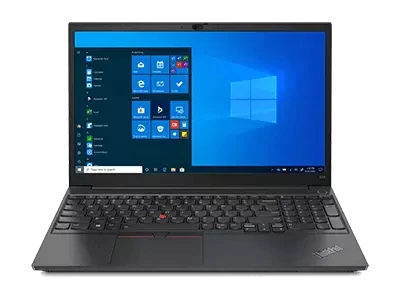
A TrackPoint provides users an additional means of interacting with their laptop. The TrackPoint is a small cursor control device located in the center of the keyboard. It is red and textured, and roughly resembles a pencil eraser in appearance. Users can interact with the screen by applying pressure on the TrackPoint.
To move the cursor around, you can simply apply pressure in the direction you wish the cursor to go; if you apply more pressure, the cursor will move with greater speed. Like the TrackPad, the TrackPoint also includes shortcuts for ease of use. For example, it can be used to scroll up or down, rather than as a cursor. The benefit of the TrackPoint is that it limits all movement to a single finger, making it incredibly simple to use.
How to use TrackPoint and TrackPads
The TrackPad and TrackPoint offer different ways to interact with your laptop. On some Lenovo models, both a TrackPoint and TrackPoint are included. Here is how you use them:
- TrackPad – The TrackPad is a flat surface area found at the bottom of the keyboard. Immediately below the trackpad, you may find one or two buttons, similar to those found on a mouse. However, not all TrackPads include buttons. To use the TrackPad, swipe your fingers across the surface to move the cursor, double-swipe to scroll up or down on the screen, pinch or expand your fingers to zoom, or double-tap to select an item or open a program. The ThinkPad TrackPad is a versatile, intuitive, and incredibly useful interface.
- TrackPoint – To use the TrackPoint, you once again have options. You can use it to move the cursor around the screen, or to scroll through a document or web page. Simply apply pressure in the direction you want the cursor to move. If you have a document open, such as a PDF, simply hold down on the TrackPoint to activate the scroll function. You can even use it to zoom in on the screen by pressing and holding down on the TrackPoint center button. The advantage of the TrackPoint is its ease of use; you can navigate through a document or manipulate your screen without ever moving your hands.
Both of these interfaces offer unique benefits. Their different approaches lead many people to form loyalties to one over the other. This leads to a common question – which is better?
TouchPad vs TrackPoint
There is no one winner between TouchPads and TrackPoint cursors. The two offer entirely different user interfaces, and with practice and experience, a user can easily master both to seamlessly interact with their laptop. Some individuals like that the TrackPoint limits all inputs to a single button, while others prefer to use finger swipes and gestures. Ultimately, the side that you come down on in the TrackPad vs TrackPoint debate will depend on personal preference.
Koop gerelateerde producten
Beperkingen: Bestellingen beperkt tot 5 computers per klant. Ga voor grotere hoeveelheden naar het gedeelte "Waar verkrijgbaar" van de website voor de gegevens van verkopers en wederverkopers van Lenovo-producten.
Aanbiedingen en beschikbaarheid: Alle aanbiedingen zijn afhankelijk van hun beschikbaarheid. Aanbiedingen, prijzen, specificaties en beschikbaarheid kunnen zonder kennisgeving worden gewijzigd. De productaanbiedingen en specificaties die op deze website staan vermeld kunnen te allen tijde en zonder kennisgeving worden gewijzigd. De weergegeven modellen zijn alleen ter illustratie. Lenovo is niet aansprakelijk voor fotografische of typografische fouten. De pc's die hier worden weergegeven, worden inclusief besturingssysteem verzonden.
Prijzen: De weergegeven webprijzen zijn inclusief btw. De prijzen en aanbiedingen in de winkelwagen zijn onder voorbehoud van wijzigingen totdat de bestelling is geplaatst. *Prijsstelling - besparingen ten opzichte van reguliere webprijzen van Lenovo. De prijzen van wederverkopers kunnen afwijken en kunnen hoger zijn dan de prijzen die hier worden weergegeven.
Alle prijzen zijn in euro en inclusief BTW
Batterij: Deze systemen ondersteunen uitsluitend batterijen die gemaakt of geautoriseerd zijn door Lenovo. De systemen zullen opstarten, maar het kan gebeuren dat ongeautoriseerde batterijen niet worden opgeladen. Lenovo is niet verantwoordelijk voor de prestaties of veiligheid van ongeautoriseerde batterijen en geeft geen garanties af voor storingen of schade voortvloeiend uit het gebruik van deze batterijen. **De levensduur van de batterij is gebaseerd op de MobileMark® 2014-methodologie en is een geschatte maximumduur. De werkelijke levensduur van de batterij kan variëren afhankelijk van vele factoren, waaronder de helderheid van het beeldscherm, de actieve toepassingen, functies, instellingen voor energiebeheer, leeftijd en gebruik van de batterij en andere voorkeursinstellingen van de klant.
Algemeen: Bekijk belangrijke informatie van Microsoft® die van toepassing kan zijn op uw aangeschafte systeem, inclusief gegevens over Windows 10, Windows 8, Windows 7 en mogelijke upgrades/downgrades. Lenovo vertegenwoordigt geen producten of services van derden en biedt geen garantie ten aanzien van producten en services van derden.
Handelsmerken: Lenovo, ThinkPad, IdeaPad, ThinkCentre, ThinkStation en het Lenovo-logo zijn handelsmerken van Lenovo. Microsoft, Windows, Windows NT en het Windows-logo zijn handelsmerken van Microsoft Corporation. Ultrabook, Celeron, Celeron Inside, Core Inside, Intel, het Intel logo, Intel Atom, Intel Atom Inside, Intel Core, Intel Inside, het Intel Inside logo, Intel vPro, Itanium, Itanium Inside, Pentium, Pentium Inside, vPro Inside, Xeon, Xeon Phi, Xeon Inside en Intel Optane zijn handelsmerken van Intel Corporation of zijn dochterondernemingen in de Verenigde Staten en/of andere landen. Andere namen van bedrijven, producten of services zijn mogelijk handelsmerken of servicemerken van anderen.
